Minecraft Dungeons II guide
Read all your effects before changing gear
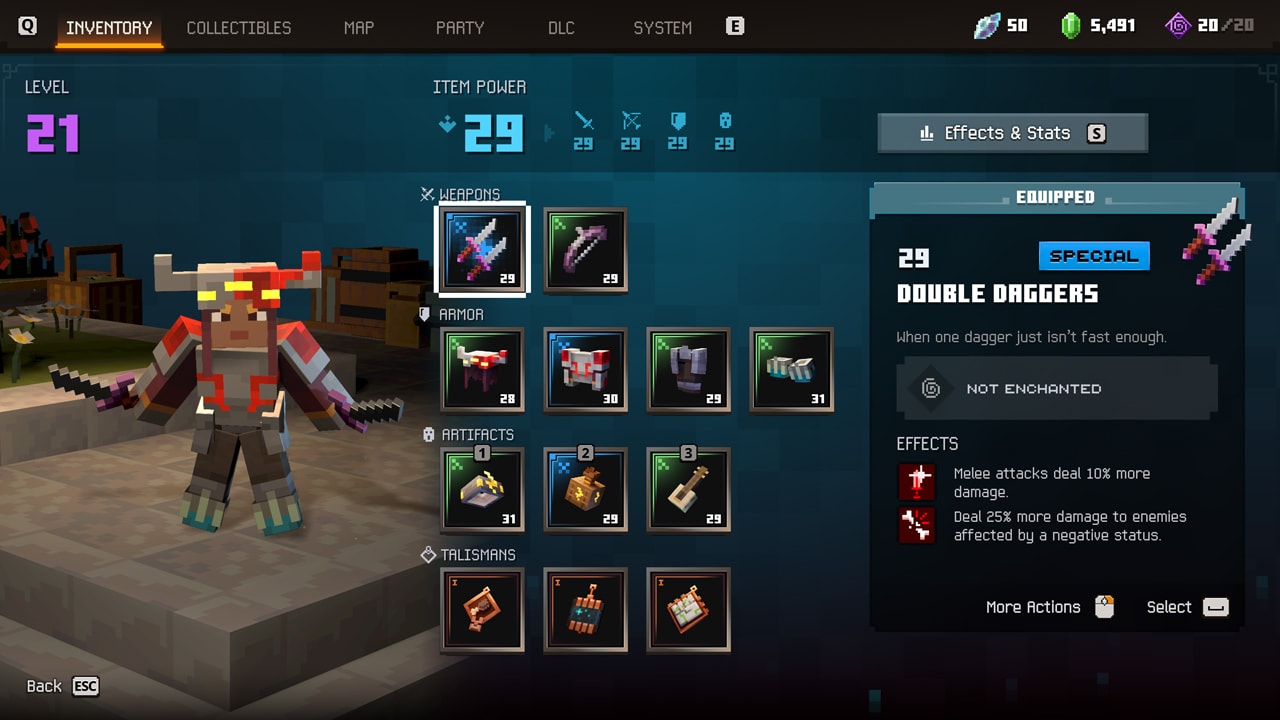
Use the preview effect summary to read weapon, armor, and talisman effects together before you change gear. The August hands-on calls it Effects and Enchantments, while the preview screenshot on this page shows Effects & Stats; both point to the same useful goal of reading the whole loadout.
The two preview labels differ, so focus on what the overview helps you decide: whether your active effects support the job you chose. It is not a published launch button path or a promise that any number is final.
On this page
Why one effect list helps
The August hands-on describes an overview that puts effects from weapons, armor, and talismans in one list. That helps you see the loadout as a combined plan instead of reading every piece in isolation.
Understand the preview naming difference
The Gamescom write-up uses Effects and Enchantments. The preview inventory screenshot visibly labels an entry Effects & Stats. That difference is worth noticing before launch, but it does not change the reading method or establish a universal final menu name.
Use the overview to compare a change
Compare one effect with the condition it needs. In the preview inventory on this page, one visible effect is about making melee attacks deal more damage, while another is about dealing more damage to enemies affected by a negative status. If your current loadout has no steady way to apply that status, do not read the conditional effect as a constant damage bonus. First check whether one of your weapon, armor, or talisman effects supplies the condition; then decide whether changing that piece would complete a plan you actually use.
The direct melee example can make more sense when you regularly attack up close. The conditional example becomes more interesting only when you can identify its trigger in the rest of the loadout. That is the comparison habit the preview summary is useful for: read the effects together, then change the one piece that resolves a real gap.
Keep planning: Read the gear layers · See the preview synergy example